
“Go ahead and accept the offer,” the client says over the phone. You hit 'end call,' log the settlement, and move forward.
But three weeks later, the tone shifts. "I never authorized that amount," the client claims. "I felt pressured to say yes, and I certainly didn't agree to those terms."
This is the classic case of settler’s remorse, and it’s a nightmare for any attorney. Your handwritten notes say one thing; the client’s memory says another. Suddenly, a routine instruction has spiraled into a formal dispute, and you’re left wondering if your scribbled evidence notes will hold up under scrutiny.
If your firm is busy, you already know the truth: memory is a fickle witness, and you can’t build a defense on “I’m pretty sure.” Missing details from calls don’t just create confusion; they create professional liability.
In this article, we’ll explore why relying on memory and handwritten notes is a gamble your firm shouldn't take. We’ll cover how call recording prevents misunderstandings, confirms verbal instructions, and shuts down disputes before they start. Most importantly, we’ll explain why where you save those recordings is just as critical as the recording itself.
What is call recording?
A call recording is an audio file of a phone conversation that you can replay, store as part of your client records, and share when needed.
The old-school version involved taking calls on speaker with a dictaphone or hoping you wrote everything down correctly. Thankfully, modern technology has made call recording much easier and more reliable.
Is call recording legal?
Disclaimer: This section provides general information, not legal advice. Always confirm the specific rules in your jurisdiction.
Call recording laws vary by country, state, and sometimes even by profession. Call recording laws generally fall into two categories:
- One-party consent: Only one person on the call needs to know it’s being recorded (often that can be you).
- Two-party (or all-party) consent: Everyone on the call must be informed and agree before recording.
When in doubt, the safest approach is to disclose the recording. It builds trust and avoids surprises.
That could be something as simple as:
“Just a heads-up, I'm going to record this call to make sure I don't miss any of your instructions. Is that okay with you?”
Why law firms use call recording
Recording calls helps firms capture the exact facts, wording, and context of conversations without relying on memory or rushed notes. When used responsibly and in compliance with privacy laws, the benefits are significant:
- A clear source of truth: Recordings create an objective record of what was said, which can de-escalate misunderstandings and “I didn’t say that” moments.
- Accurate documentation: Even great note-takers miss details. Recordings capture names, dates, and instructions correctly.
- Protection against malpractice: If a client later disputes advice or claims they weren’t informed of a risk, a recording can help demonstrate what was explained and when.
- Operational efficiency: Spend less time writing notes after calls.
Where most phone call recording options fall short
Many smartphones and calling apps can record audio, but they aren't built for legal workflows. Most recordings end up saved locally on a phone or laptop, with no reliable way to automatically file them to the right matter or link them to your legal software.
For law firms, the key isn't just having the recording, but having it saved in the right place.
That’s where a legal phone system like VXT makes all the difference. VXT is built specifically for law firms and integrates with leading legal practice management systems such as Clio, MyCase, Smokeball, and Filevine. This allows call recordings, notes, and even billable time to be saved automatically to the correct client and matter in your legal software.
From a call recording perspective, that means no more downloading files, renaming audio clips, or manually uploading them to a case. Recordings are stored exactly where they belong, alongside the rest of the matter history.
And recordings are only part of the picture. With AI-powered transcripts and summaries, VXT turns each call into clear, usable file notes, capturing key details so you spend less time writing notes and more time progressing the work.
In practice, law firms get the most value from call recording when it’s consistent, centrally stored, and directly linked to the right client and matter.
So what should firms actually look for when choosing call recording software?
Best call recording software for law firms
Call recording delivers the most value when it’s consistent, managed firm-wide, and built into everyday workflows (instead of being left up to individual habits). If you’re evaluating call recording software for your firm, use this checklist to separate basic recording from a system built for legal workflows.
Look for a solution that offers:
- Recording built into a phone system: Call recording is part of your core phone system, not a disconnected third-party tool, so calls, recordings, and call data stay in one place.
- Automatic and manual recording: Automatic recording for consistency, with manual recording available when a call is sensitive or consent needs to be explicit.
- Admin-level enforcement: Controls that allow administrators to enforce firm-wide recording rules, rather than relying on individual discretion.
- Centralized cloud storage: Recordings are stored centrally in the cloud (not on individual phones or laptops) and remain with the firm even if staff leave.
- Legal software integration: Recordings automatically save to the correct client and matter in your practice management system.
- Custom recording announcements: The ability to play consistent call recording disclosures or greetings to support consent requirements.
- Permissions and retention: Controls over who can access recordings and how long they’re kept.
If you’re checking these boxes, you’re not just looking for a way to record calls, you’re looking for a system your firm can trust.
But knowing what to look for is one thing. Seeing how it works in a real firm is another.
Here’s how one firm put consistent call recording into practice.
How Saunders & Co Lawyers use VXT Phone to record their calls
Saunders & Co-Lawyers is a New Zealand–based law firm with around 90 staff across four offices throughout Canterbury. The firm handles more than 6,000 calls each month, making accurate records of client conversations essential.
They needed a dependable way to capture and reference those conversations, but their legacy phone system made it difficult to record calls or retrieve key details when needed.
With VXT, Saunders & Co automatically records and transcribes client calls (with consent), reducing the risk of disputes, eliminating manual note-taking, and keeping call records easy to find whenever the team needs to confirm what was said. It’s a simple, repeatable process the whole team can rely on.

How to record calls with VXT Phone
If you want to see how call recording works in VXT, the video below gives a quick walkthrough.
If you don’t want to watch the video right now, here are a few key points about how call recording works in VXT.
Call recording enforcement in VXT
Call recording in VXT can be controlled through firm-wide settings, rather than being left to individual staff to decide on every call. Admins can choose how recording is enforced across the firm:
- Allow (default): Users can choose whether to record a call and can toggle recording on or off during the call.
- Always: Calls are recorded automatically and users can’t turn recording off.
- Never: Call recording is disabled for everyone on the team.
An admin can set the rules once, and they then apply across the firm.
Toggling auto-recording on/off in VXT
Admins can also decide whether calls are recorded by default for specific numbers. This setting lets you automatically record incoming calls, outgoing calls, or both. Even when auto-recording is enabled, recording can still be stopped mid-call if required.

Record calls manually in VXT
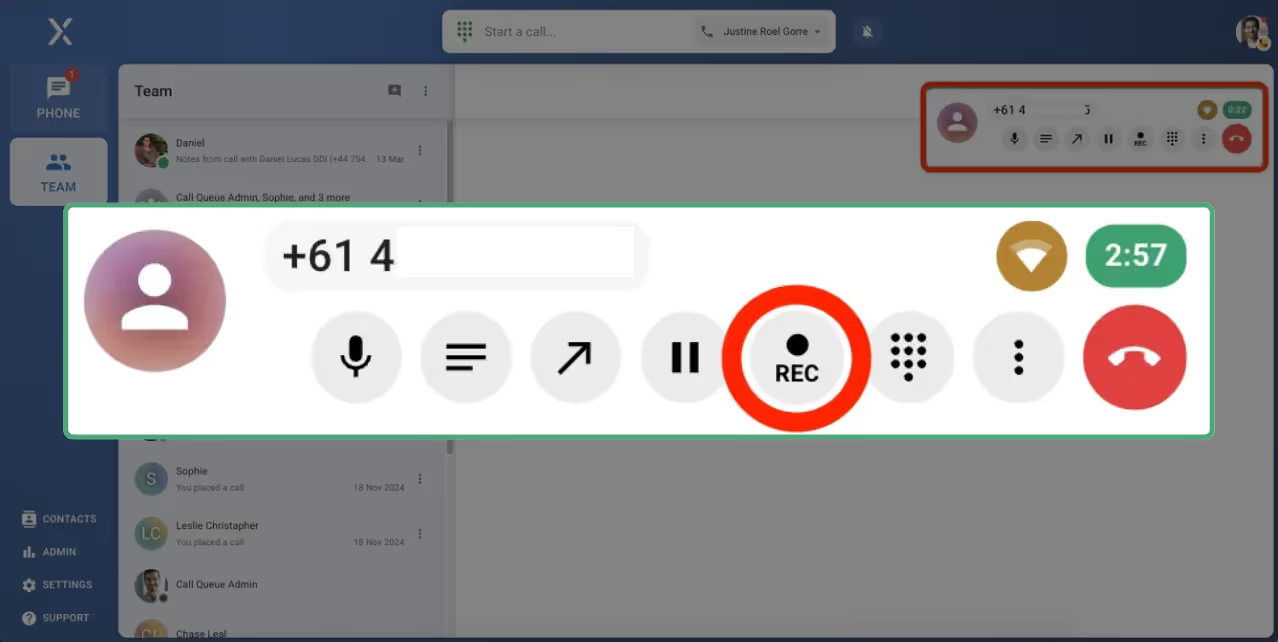
If automatic recording isn’t enabled, staff can still start recording manually, even after a call has begun. During a call, they simply click the Record button in the call pop-up and can stop recording at any time.
Set call recording announcements
In VXT, you can also decide how disclosure is handled. Many firms choose to either:
- play an automatic call recording announcement at the start of recorded calls, or
- include recording disclosure as part of a custom welcome message in their call flow
This helps keep consent consistent without relying on staff to remember what to say on every call.
Want the full step-by-step setup guide on call recording? See our support article on how to enable call recording in VXT.
Start recording calls at your law firm with VXT
Call recording is one of the simplest ways to protect your firm, improve accuracy, and save time, but only if it fits into the way legal work actually happens. While iPhones, Androids, and generic VoIP tools offer basic recording, they’re not designed with an attorney’s needs in mind.
VXT is a phone system built for law firms. You can record calls on any device and automatically save them to the right contact and matter in your practice management system. And with AI-powered transcripts and summaries, your team can spend less time rewriting calls into notes and more time moving cases forward.
If you want more reliable records, fewer disputes, and a call recording workflow your whole firm can trust, VXT makes it easy to get started.


.jpg)